

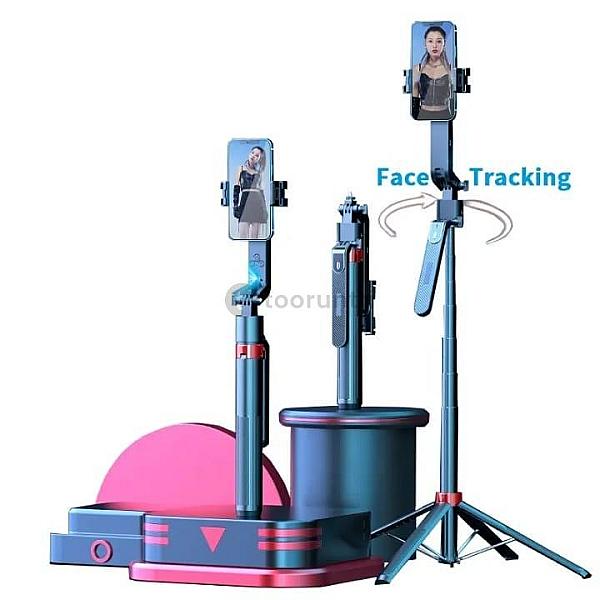
Q185 Smart AI Gimbal Selfie Stick 1.8M Tripod Bracket Integrated Handheld Gimbal

Kancho Store
Verified Business
Other Electronics
Description Report Item Selfie Stick Alloy Desktop 360° Gimbal Selfie Stand Pole Wireless Bluetooth for Live Streaming Photo and Video Stand Specification: Size: 180cm (telescopic) 29.5cm (contract) Bluetooth-compatible version: compatible with Bluetooth 4.0 Bluetooth-compatible transmission distance: 10M/32.81ft Support system: for IOS 5.1 or later, for Android 4.44 or later Note: Due to manual measurement, there may be slight deviations. How to use it: 1. Press and hold the button on the remote control to turn it on. 2. Turn on Bluetooth compatible with the phone, search for the new device, and then connect it. 3. After pairing and connection is completed, open the mobile phone camera software. 4. Adjust the pose Press the shutter on the remote control to control the photo. Bluetooth connection matching Compatible with iOS and Android systems 1. Press and hold the "Photo button" for 3 seconds to open it. The indicator light will flash and enter the search state 2. Turn on Bluetooth on your phone to search for "Ulanzi" and connect. After successful connection, the indicator light will turn off. Packing list: 1 x Selfie Stick 1 x Remote control 1 x Charging cable 1 x Instruction manual
Description Report Item Selfie Stick Alloy Desktop 360° Gimbal Selfie Stand Pole Wireless Bluetooth for Live Streaming Photo and Video Stand Specification: Size: 180cm (telescopic) 29.5cm (contract) Bluetooth-compatible version: compatible with Bluetooth 4.0 Bluetooth-compatible transmission distance: 10M/32.81ft Support system: for IOS 5.1 or later, for Android 4.44 or later Note: Due to manual measurement, there may be slight deviations. How to use it: 1. Press and hold the button on the remote control to turn it on. 2. Turn on Bluetooth compatible with the phone, search for the new device, and then connect it. 3. After pairing and connection is completed, open the mobile phone camera software. 4. Adjust the pose Press the shutter on the remote control to control the photo. Bluetooth connection matching Compatible with iOS and Android systems 1. Press and hold the "Photo button" for 3 seconds to open it. The indicator light will flash and enter the search state 2. Turn on Bluetooth on your phone to search for "Ulanzi" and connect. After successful connection, the indicator light will turn off. Packing list: 1 x Selfie Stick 1 x Remote control 1 x Charging cable 1 x Instruction manual
Color:
Multicolor
Condition:
New
Warranty:
No Warranty
Delivery Type
Paid
Delivery Details
Delivery Charge may vary by location and delivery method. Final cost is agreed by buyer and seller.
Seller's Choice: Each seller may choose whether or not to provide delivery for their products.
Delivery Options: If delivery is available, the seller will specify whether it is free or paid, and in the case of paid delivery, the applicable charges will be displayed.
Direct Communication: Buyers and sellers are encouraged to communicate directly to confirm delivery details, charges (if any), and timelines.
Platform Responsibility: Please note that our platform is not responsible for product delivery, shipping arrangements, or related costs. All delivery agreements are made solely between the buyer and the seller.


